Short version
In OBS, open Docks → Custom Browser Docks, add a dock named Commercial Cue with the URL https://commercialcue.com/dock, sign in inside the dock, and follow its two setup steps.
The dock is Commercial Cue's break controls in a panel inside OBS: the countdown, Return to live, Play slate, the length buttons and the pod picker. Operators can run a whole show without leaving OBS.
1. Copy the dock URL
The dock's address is https://commercialcue.com/dock. You can also copy it from:
- Settings → OBS, step 3 of the setup assistant, with Copy
- the sign-in page, under "Operating from OBS?"
2. Add it in OBS
- In OBS, open Docks → Custom Browser Docks. (In OBS 28 and 29 it's View → Docks → Custom Browser Docks.)
- Add a row: name it Commercial Cue and paste the URL.
- Click Apply. The dock opens; drag it wherever suits your layout.
3. Sign in inside the dock
The first time, the dock says "Sign in to use the dock panel". Press Sign In and sign in with Google, as you do on the website. You come back to the dock afterwards.
Operators sign in with the same account they were invited with.
4. Finish the setup wizard
While OBS isn't connected, the dock shows a short setup wizard.
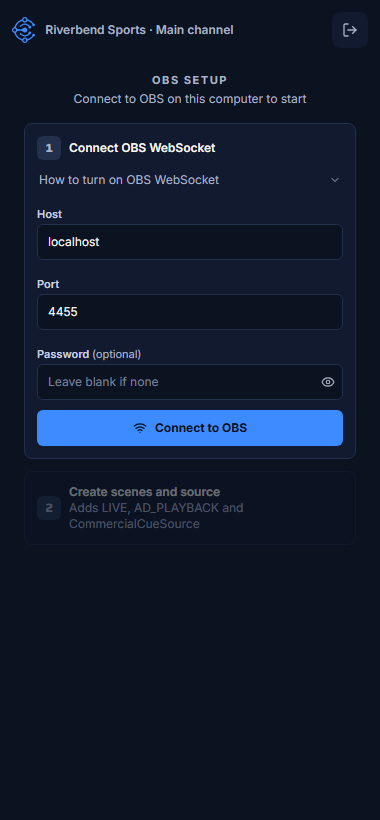
- Connect OBS WebSocket. Enter the Host (
localhost), Port (4455) and Password (optional), then press Connect to OBS. Turn on OBS WebSocket first if you haven't: see Connect OBS. - Create scenes and source. Adds LIVE, AD_PLAYBACK and CommercialCueSource if they're missing. See Create the scenes and media source.
- Press All set. Open controls, or Skip and open controls if you'll finish later.
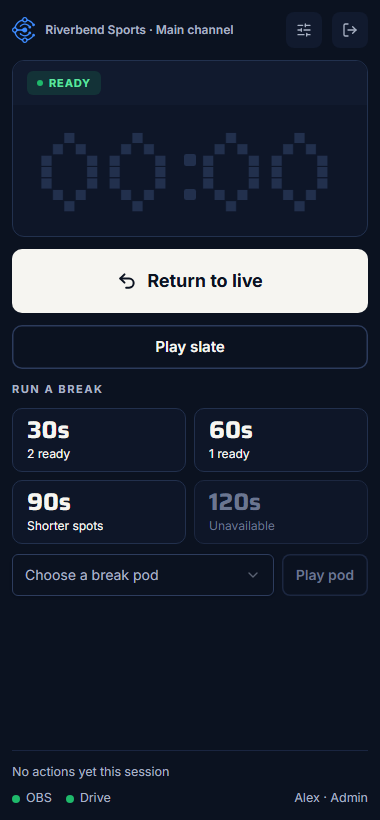
How the dock connects
- It uses the OBS details saved in its own browser, if there are any.
- Otherwise it uses the details saved for your workspace when someone pressed Connect to OBS in Settings.
OBS's built-in browser keeps its own storage, separate from Chrome. Saving the connection once in Settings → OBS means everyone's dock, operators included, can connect without typing the details again.
Use the dock and the control room together
A break you start in the dock also shows in your own control room, with the running order and activity the dock doesn't have room for.