Short version
Export every spot as MP4 with H.264 video and AAC audio, make it about as long as its folder (a 30s spot runs about 30 seconds), and start the file name with the advertiser: ValleyFord-Fall-Event-30.mp4.
Use MP4 (H.264 and AAC)
MP4 files with H.264 video and AAC audio play most reliably in OBS. If your editor or sponsor sends something else, re-export it as MP4 before you put it in Drive.
Readiness labels
Each spot in the ad library gets a readiness label. It's decided by the file type only; Commercial Cue doesn't inspect the video inside.
| File type | Readiness | Plays? |
|---|---|---|
.mp4 | Ready | Yes |
.mov, .avi, .webm and other video types | Warning | Yes, but MP4 is safer |
.mkv | Not recommended | Yes, but MP4 is safer |
| Anything else | Unplayable | Never |
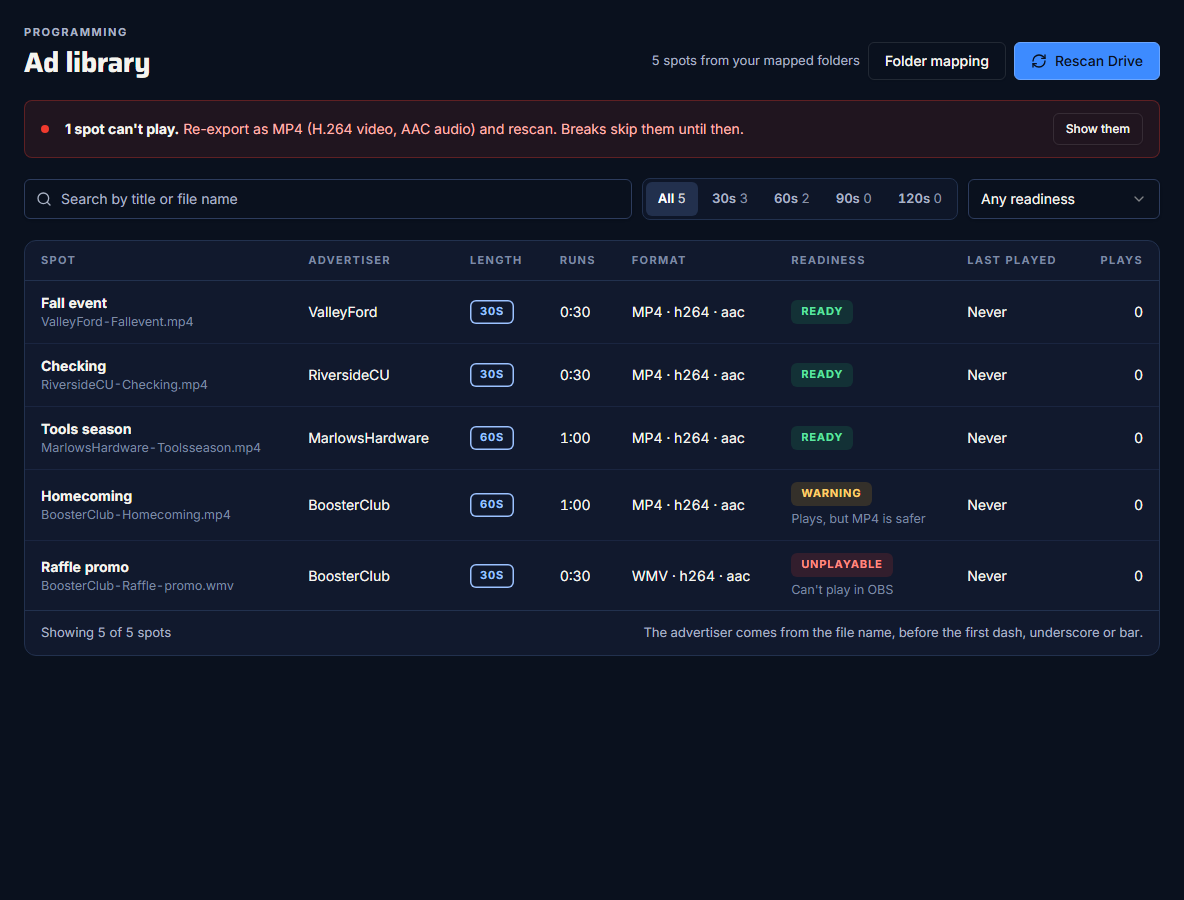
When a spot is Unplayable, the library shows a banner: "Re-export as MP4 (H.264 video, AAC audio) and rescan." Unplayable spots are hidden by default; press Show them to see which ones. Breaks skip them until you fix them.
An MP4 label isn't a guarantee
Because readiness comes from the file extension, an MP4 with an unusual codec inside still shows as Ready. Test new spots in a rehearsal before a big show.
Match the length to the folder
A spot's length is its folder's length. Commercial Cue doesn't check the real running time against the folder.
- Keep each spot close to its folder's length: a 30s spot should run about 30 seconds.
- A shorter spot leaves a gap at the end of the break. The slate fills it, if you've chosen one. See Choose a slate.
- A much longer spot runs past the end of the break.
The library also shows each spot's real duration, read from Google Drive. It can be blank for a while after you upload, until Drive has processed the video.
Name files for the advertiser
- The title is the file name without its extension.
- The advertiser is the text before the first
-,_or|.
| File name | Title | Advertiser |
|---|---|---|
ValleyFord-Fall-Event-30.mp4 | ValleyFord-Fall-Event-30 | ValleyFord |
RiversideCU_Checking.mp4 | RiversideCU_Checking | RiversideCU |
Homecoming.mp4 | Homecoming | (blank) |
The advertiser matters: a break never plays two spots from the same advertiser. Spots with a blank advertiser don't count towards that rule.
After you change files
Rescan Drive after adding, renaming or removing spots. Nothing updates on its own. See Map your break folders and rescan.