Short version
Proof of play lists every break: when it started, how long it was meant to be and really ran, what filled it, who ran it and how it ended. Click a break to see its spots.
Proof of play is for the workspace admin. Open Proof of play in the sidebar. Every break run from the control room or the OBS dock is logged here automatically.
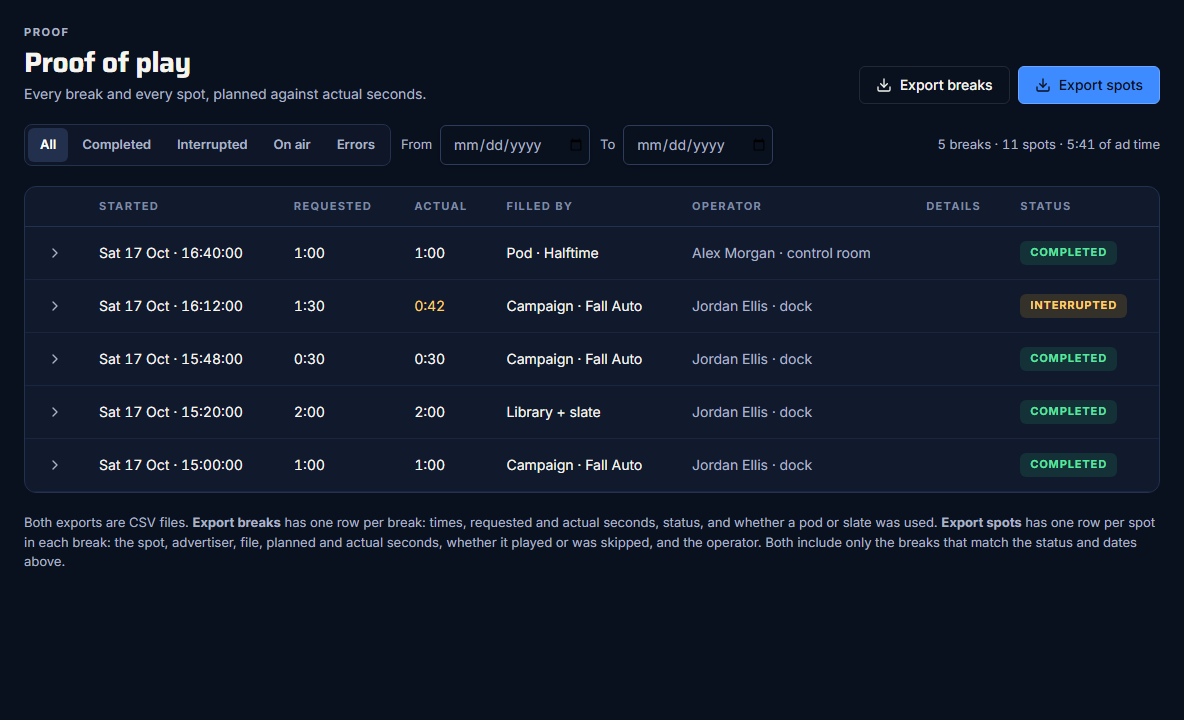
The columns
| Column | What it shows |
|---|---|
| Started | The day and time the break started. |
| Requested | The break length that was pressed (or the pod's target). |
| Actual | How long it really ran. Amber when it was shorter than requested. |
| Filled by | "Campaign · {name}", "Pod · {name}" or "Library", plus "+ slate". |
| Operator | Who ran it, and where: "{name} · dock" or "{name} · control room". |
| Details | Why a break failed, if it did. |
| Status | How it ended. |
Statuses
- On air: running now.
- Completed: every spot played to the end.
- Interrupted: someone pressed Return to live, or Play slate. See Return to live early.
- Failed: the break couldn't carry on. Details says why, for example a spot didn't start, or the page running the break was closed. The Errors filter lists them.
Filter the list
- All, Completed, Interrupted, On air or Errors.
- From and To dates, using your own days. To includes the whole of that day. Clear dates resets them.
The summary line, "N breaks · N spots · {time} of ad time", covers every break that matches the filters, not just the page you're looking at. It counts only spots that played.
The list shows 20 breaks a page, with Previous and Next, and refreshes every 10 seconds.
See a break's spots
Click the arrow at the start of a row to open the break.

| Column | What it shows |
|---|---|
| # | The spot's place in the break. |
| Started | When the spot started. |
| Spot | The title and advertiser. |
| Type | Spot or slate. |
| Planned | How long it was meant to run. |
| Actual | How long it ran. |
| Result | Played or Skipped. |
- A spot counts as Played when OBS confirmed it started, even if the break was cut short during it. Spots that never started are Skipped.
- A spot's Actual time runs from its start to the next spot's start, so it includes the second or so the next spot takes to load.
To keep a copy or send it on, see Export breaks and spots to CSV.
Related guides
Proof for sponsorsExport breaks and spots to CSVTwo CSV files, one row per break or one row per spot, following your filters.Proof for sponsorsUse the campaign reportPlays, airtime and plays by week for a campaign, against its targets.Run breaksReturn to live earlyCut back to the show straight away, and how the break is logged.