Short version
The admin sets everything up and can use every page. Operators run breaks, in the control room and the OBS dock, and nothing else.
Two roles
| Page | Admin | Operator |
|---|---|---|
| Control room | Yes | Yes |
| OBS dock | Yes | Yes |
| Guides | Yes | Yes |
| Overview | Yes | No |
| Ad library, Campaigns, Break pods | Yes | No |
| Proof of play, Campaign reports | Yes | No |
| Settings (OBS, Slate, Google Drive, Team) | Yes | No |
If an operator opens a page they can't use, they're taken to the control room.
The admin
- Each workspace has one admin: the person who created it.
- The admin can't be removed from Settings, and nobody can be promoted to admin.
- Invites always create operators.
What operators see
Operators don't get the sidebar. They see a top bar with the workspace's name, Guides (which opens in a new tab), their name and Sign out, and the control room below.
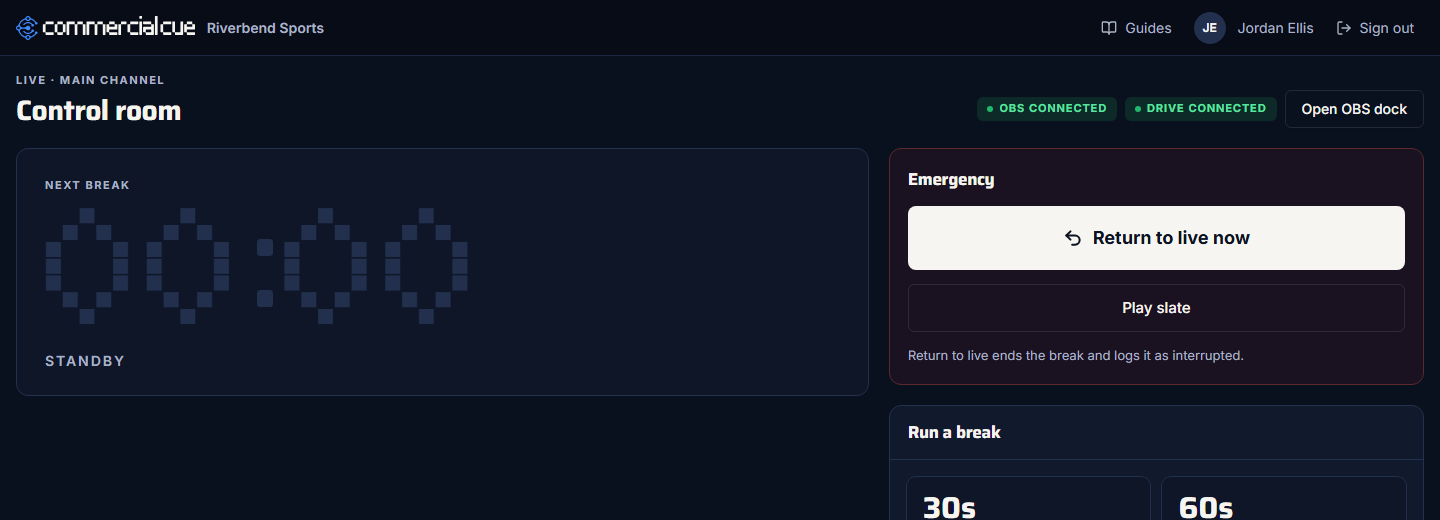
Operators can do everything needed during a show:
- run breaks and play break pods
- return to live early
- play the slate
- use the OBS dock
They can't change the library, campaigns, pods, the slate or settings, so nothing gets changed by accident mid-show.
Operators and OBS settings
Operators can't open Settings, but their control room and dock still connect to OBS with the details the admin saved there. Save the OBS connection once in Settings → OBS.
Related guides
TeamInvite an operatorCreate an invite link, send it yourself, and the operator signs in with Google.TeamRemove an operator and rename your workspaceThe members list, removing access, and your workspace's name.Getting startedSign in and set up your workspaceContinue with Google, name your workspace, and understand who the admin is.