Short version
In Campaigns, press New campaign, give it a name and dates, switch on Active, then open it and Add spots. While it's running, its spots fill your breaks first.
A campaign is a set of spots with dates, usually one sponsor's flight. While it runs, breaks are filled from its spots first, with weights deciding how often each plays.
Create one
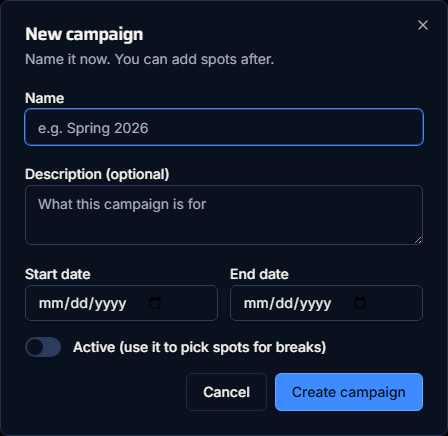
- Open Campaigns and press New campaign.
- Fill in:
- Name (required)
- Description (optional)
- Start date and End date. Either can be empty for no limit.
- Active (use it to pick spots for breaks). It's off by default.
- Press Create campaign.
Add spots
- Open the campaign from the list.
- Press Add spots.
- Search by title or advertiser, or pick a length, and add the spots you want. Each starts with a weight of 10.
A spot can be in more than one campaign. To take one out, use the bin icon on its row; the app asks "Remove this spot?". Setting weights is covered in Set weights and check actual share.
Statuses
Each campaign shows a status, worked out by calendar day in your own time zone:
| Status | Meaning |
|---|---|
| Active | Switched on, and today is within its dates. |
| Scheduled | Switched on, but the start date hasn't come yet. |
| Expired | The end date has passed. The end date itself still counts. |
| Inactive | The Active switch is off. |
One campaign at a time
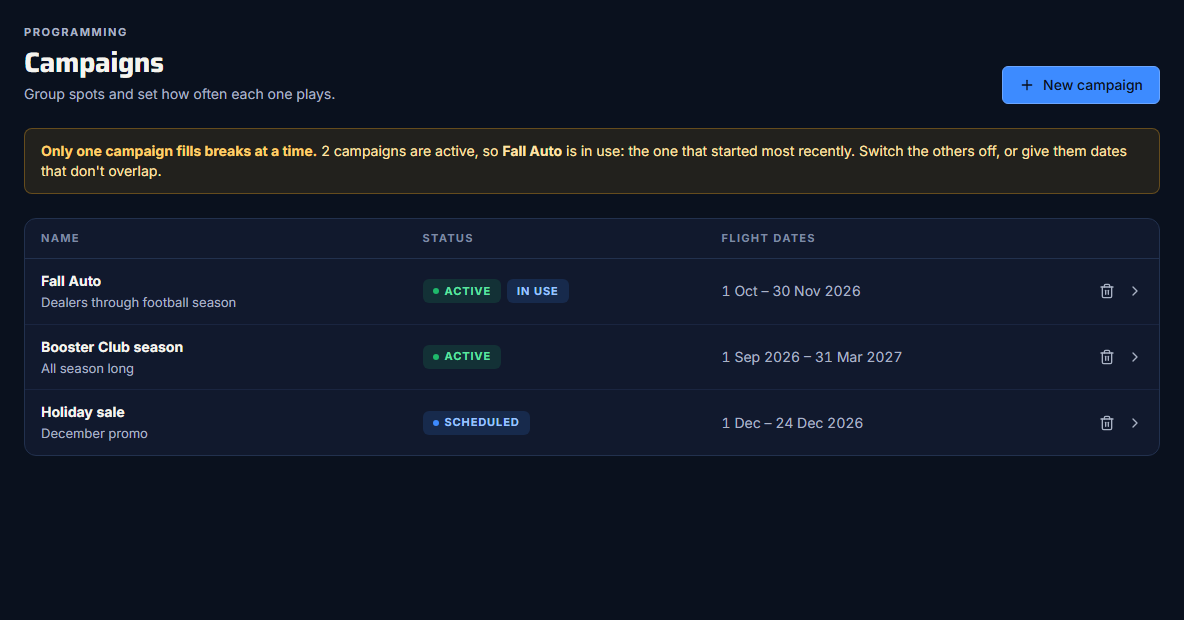
Only one campaign fills breaks at a time. If several are active on the same day:
- the one with the latest start date is used (no start date counts as the oldest)
- ties go to the one created most recently
- the list says "Only one campaign fills breaks at a time." and marks that one In use
To run a different campaign, switch the others off with Edit, or give them dates that don't overlap.
Dates are whole days
A campaign runs from the start of its start date to the end of its end date, in your time zone. There are no start or end times within a day.
Change or delete
- Edit changes the name, description, dates or Active switch.
- Delete asks "Delete this campaign?". It removes the campaign and its spot list, and deletes its sponsor share links. Proof of play and pods keep their records, without the campaign's name.